
1.8.2
iCloud
Backup
Feeds
Fixes
This release rebuilds the iCloud account. Articles no longer go through iCloud, except your favorites: each device downloads them from the sites when it syncs. A feed added on another device appears right away, and its articles arrive with this device's next sync. The first time you open 1.8.2, Feedler makes a backup of the account on the device, then updates it on its own and syncs it once. Please update all your devices: until a device is updated, it shares feeds and folders with the others, but not read states and favorites. Everything about the new iCloud account is in the blog post “A rebuilt iCloud account”, and the FAQ answers “How does the iCloud account work?”
- A rebuilt iCloud account: your feeds, folders, read and starred states, and the saved text of your favorites stay in step across your devices. The articles themselves no longer go through iCloud: each device downloads them from the sites when it syncs
- A backup of the iCloud account on your device, and Resync from iCloud if a device ever gets out of sync
- A feed you remove and add again comes back with everything its site still publishes
- Feeds that a server sends as a web page now work, and several fixes
iCloud
- The first time you open 1.8.2, Feedler updates your iCloud account on its own: a backup on the device first, then the update, then one sync. It needs a connection. Offline, it waits for the next launch
- iCloud now carries your feeds and folders, what you have read or starred, and the saved text of your favorites. The articles themselves no longer go through iCloud: each device downloads them from the sites when it syncs. A feed added on another device appears right away, and its articles arrive with this device's next sync. Sync on launch, on by default in Settings › Synchronization, syncs every time you open Feedler. The account also takes less of your iCloud storage
- Favorites set on one device reach your other devices right away with their saved text, even for older articles
- Adding, renaming, moving or deleting a feed or a folder of the iCloud account needs iCloud to be reachable, so every device keeps the same list. Reading and starring still work offline, and are sent when the connection is back
- If two of your feeds carry the same article, each copy has its own read state and its own star
- One iCloud account, the one of the Apple Account signed in on the device
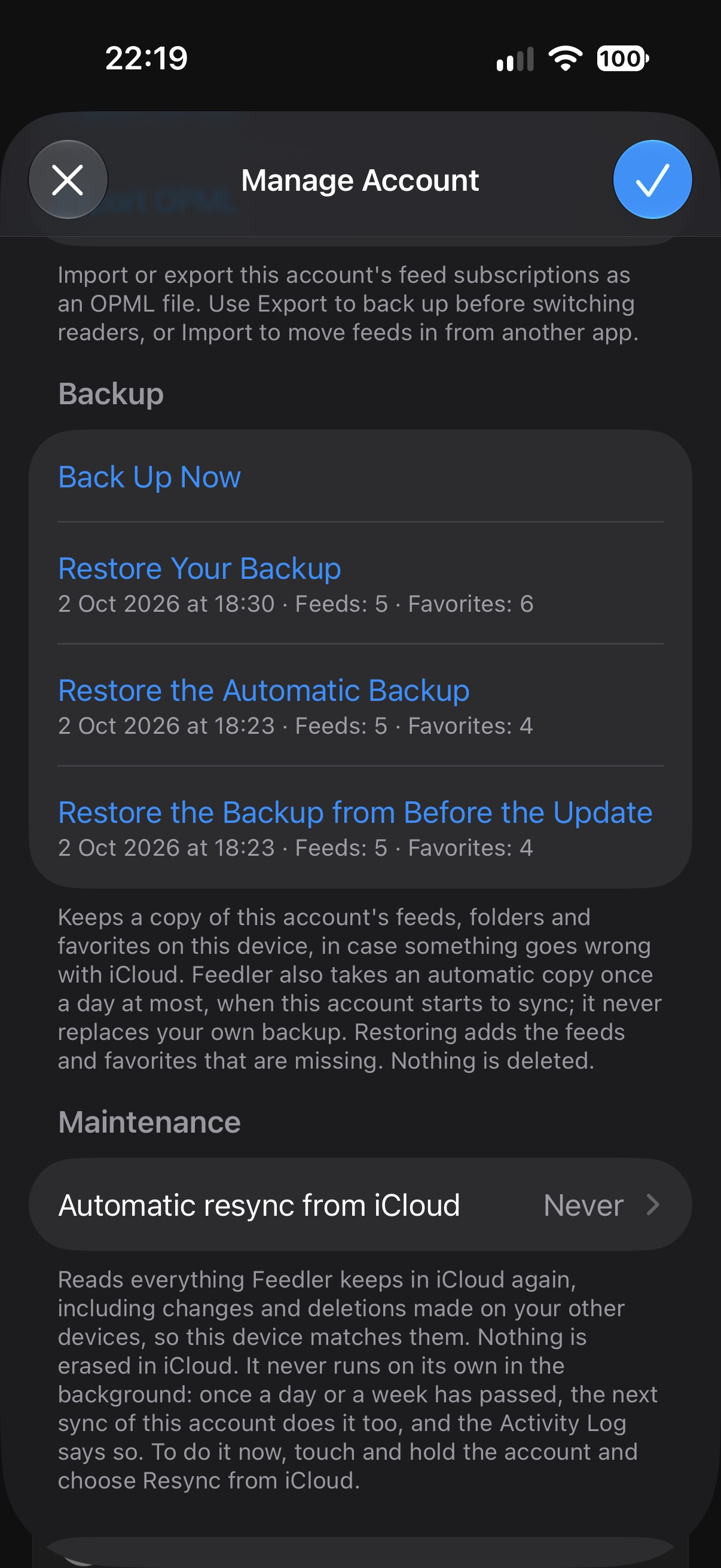
- Resync from iCloud rereads everything the account keeps in iCloud, then syncs and tells you when it is done. Long-press the iCloud account. On iPad and Mac, it is in the account menu at the top of the sidebar. It can also run once a day or once a week, in Manage Account › Maintenance. It is off by default
- If Feedler's iCloud data is deleted in the Settings app, Feedler pauses the sync and asks before uploading your library again
- Improved iCloud sync reliability in some specific situations
- The whole story is on the blog: “A rebuilt iCloud account”. And the FAQ answers “How does the iCloud account work?”
Backup
- The iCloud account now has a backup on the device, in Manage Account › Backup: your own copy with Back Up Now, an automatic copy once a day at most that never replaces yours, and the copy made before this update, kept
- Restoring a backup adds the feeds and favorites that are missing, with their saved text, and tells you how many first. Nothing is deleted, and what comes back is sent to iCloud, so your other devices get it too
- The backup stays on the device. Deleting Feedler also deletes it
Feeds & reading
- On Local RSS and iCloud accounts, a feed you remove and add again comes back with everything its site still publishes, unread
- Feeds that a server sends as a web page now work
- Regenerating an article's cache also refreshes its image
- Trending Stories explains when stories appear while there is nothing to show yet
- Article titles show their accents and apostrophes correctly in Trending Stories, Listen to Article, AI Summary, Read Later and when shared by email
Also
- Fixed a case where the Accounts screen could stop responding
- On iPad and Mac, questions and the share sheet open in the window you are using
- The Feedler Unlimited screen keeps its Terms of Use and Privacy Policy links in view